MAKE A PASSWORD LAN (Local Area Network)
1. First, open [Start] and select [Run] then type lusrmgr.msc and press Enter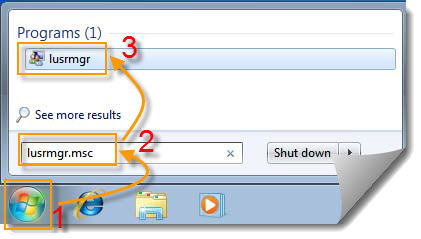
2. Then you will see Local Users and Groups window. In this window we can create a password Local Area Network (LAN).
3. Then select the Users folder on the left and look to the window on the right will display a list of existing users.
4. Select the Guest that we want to change the password. Right-click on Guest and select Set Password ...
5. Then a window will appear warning megenai risk replace / reset passwordAdministrtator. Click Proceed to continue our work.
6. Fill the new password that we want to plug in the New Password and confirm the new password sekalilagi in Confirm Password. Usefulness are:
Inhibiting the "Guest" to get into our computers via LAN, sehinggak when he wanted to get into our computers will be required Password. This also affects the access log into the computer / domain.
Given this, the sharing folder on the computer we can be much more secure. There are only certain people that we give out the password can access.
Our computers in the LAN can be much more awake:)
Hopefully helpful & good luck ..
1. First, open [Start] and select [Run] then type lusrmgr.msc and press Enter
2. Then you will see Local Users and Groups window. In this window we can create a password Local Area Network (LAN).
3. Then select the Users folder on the left and look to the window on the right will display a list of existing users.
4. Select the Guest that we want to change the password. Right-click on Guest and select Set Password ...
5. Then a window will appear warning megenai risk replace / reset passwordAdministrtator. Click Proceed to continue our work.
6. Fill the new password that we want to plug in the New Password and confirm the new password sekalilagi in Confirm Password.
Inhibiting the "Guest" to get into our computers via LAN, sehinggak when he wanted to get into our computers will be required Password. This also affects the access log into the computer / domain.
Given this, the sharing folder on the computer we can be much more secure. There are only certain people that we give out the password can access.
Our computers in the LAN can be much more awake:)
Hopefully helpful & good luck ..